
Features
Every way
to move money.
Wallets in five currencies, payment links and QR codes, card payments for business, and withdrawals to your bank. All in one account.
Total balance
$4,732.50
PAYMENT LINKS
One link. Every customer.
Every account has a public URL at payclio.com/pay/{handle}. Share it once and receive money forever, no per-transaction setup, no per-customer onboarding.
- Custom handle for merchants (e.g. payclio.com/pay/myshop)
- Phone-number URLs for personal users
- Hosted page with your business logo and name
- Open amount or amount-locked, your call
QR CODES
Scan-and-pay everywhere.
Every payment link and every payment request comes with an auto-generated QR. Print it on receipts, posters, business cards. Show it at the counter. Customers scan and land on your hosted payment page.
- Print it or share it, at any size
- Auto-generated for links and one-off requests
- Works with any phone camera, no app required
- Universal, encodes a standard URL

MULTI-CURRENCY WALLETS
Hold five currencies.
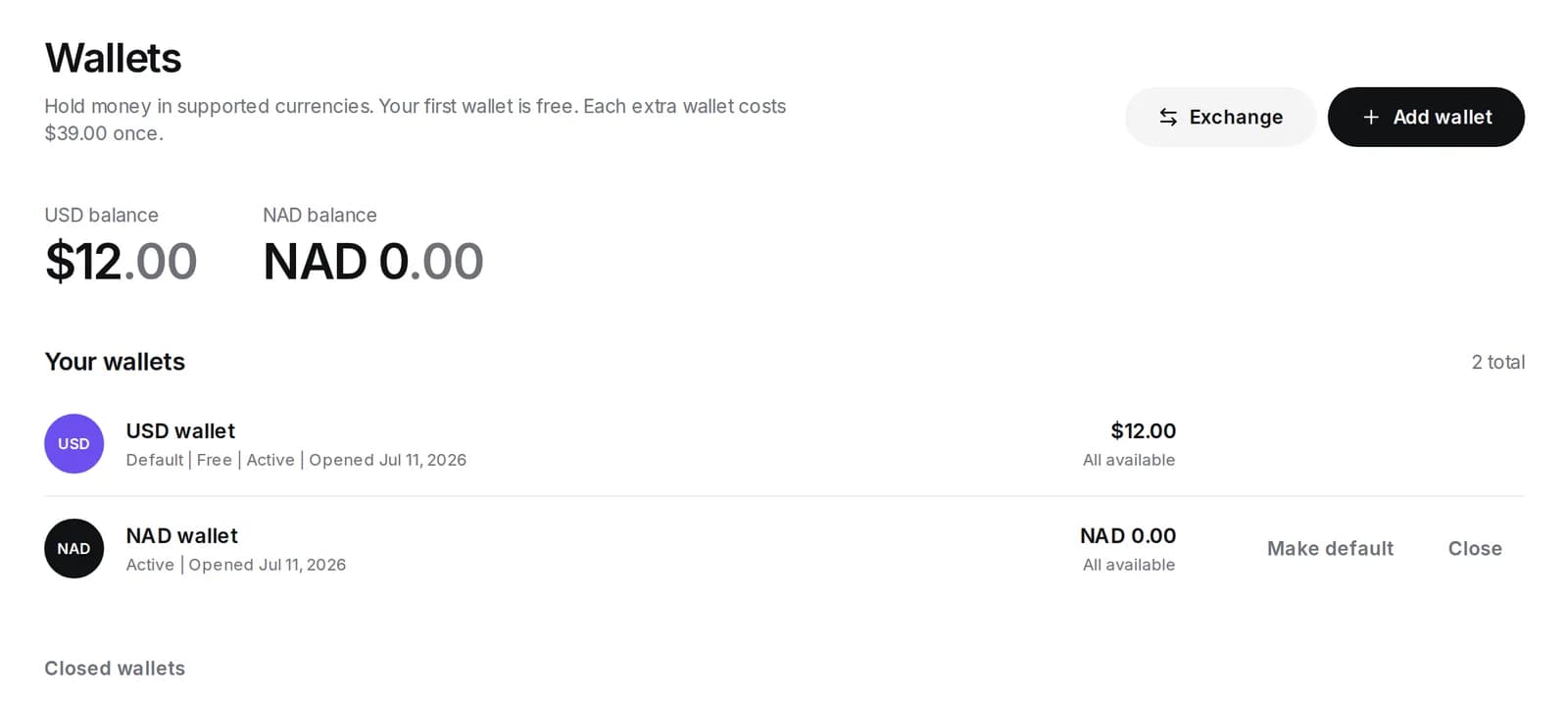
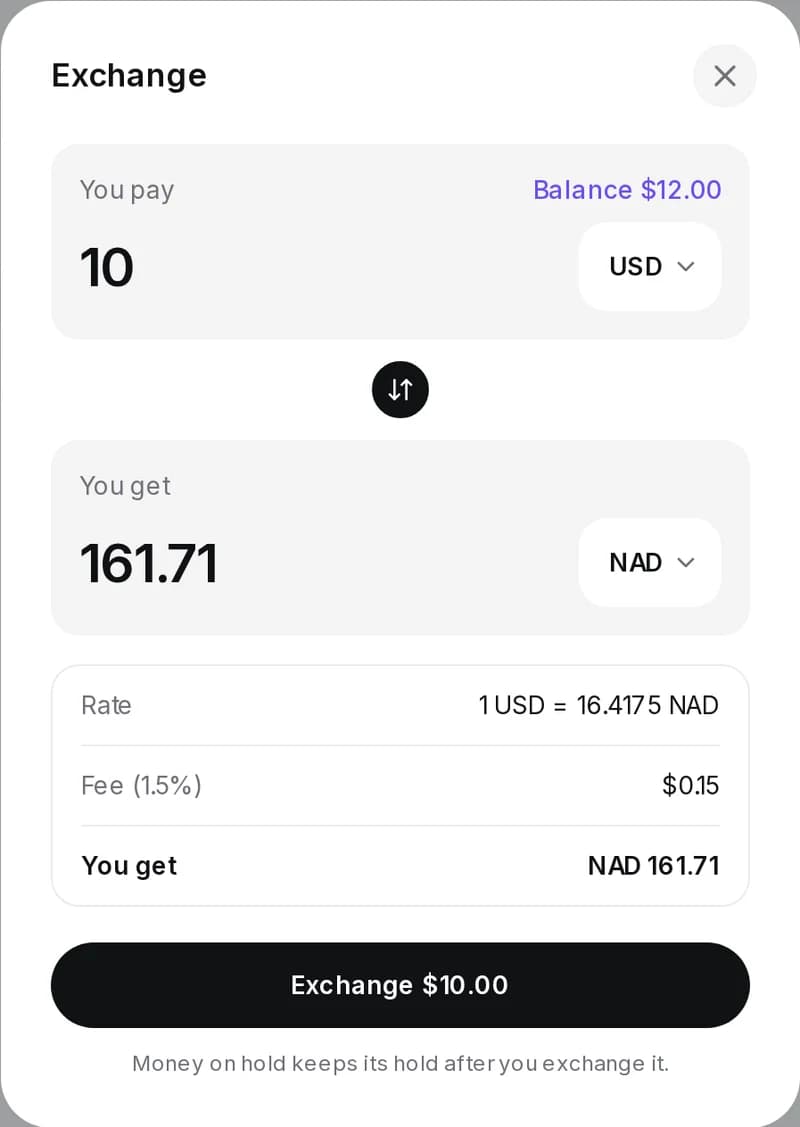
Open a free USD wallet on signup. Add EUR, GBP, ZAR or NAD for a one-off $39 each. Move money between your wallets and see the rate, the fee and what you receive before you confirm.
- USD wallet free on signup
- Additional wallets $39 one-off (paid by card or from your balance)
- Exchange fee plus a rate margin, shown before you confirm
- Converted between your own wallets straight away
PAYMENT REQUESTS
Lock the amount. Set the expiry.
Create a one-off request with a set amount and a memo. Share it with a customer, they pay it once, and you can see which request was paid.
- Amount-locked, customer can't under- or over-pay
- Expires after 7, 14, 30 or 90 days, your choice
- Memo field for invoice numbers / order refs
- Shareable URL and QR on the same page
“Invoice #4821”
PRODUCT LINKS
A checkout page for anything you sell.
Build a link for one product or service: a title, a description and photos, a set price or one your customer types in. Let them buy more than one, and ask for a phone number, a delivery address or a note.
- Set price, or the customer chooses the amount with a minimum
- Quantity, up to the limit you set
- Ask for phone, address or a note, required or optional
- Use it once or keep it open, with an end date if you want one
INVOICES
Send an invoice. Get paid on it.
Make an invoice with your logo, lines, VAT and a discount, and email it from Payclio. Your customer pays it online by card or Payclio wallet, and the invoice marks itself paid.
- Saved customers and saved products for quick lines
- Reminders before and after the due date, on your schedule
- Repeat weekly, monthly, quarterly or yearly
- PDF download, your own number format
REFUNDS
Refund a customer in two taps.
Open a payment you received and refund it. The full amount goes back to the card or Payclio wallet your customer paid with, and you pick the reason so your records say why.
- Back to the same card or wallet
- Reason on every refund: customer request, duplicate, fraud or other
- Your customer gets an email, except for fraud refunds
- The refund shows on the payment in your activity
PAY AND PAYOUTS
Pay suppliers and staff from your wallet.
Save the people you pay and pay one or many at once. Bank payments go through Payclio's payment queue, payments to other Payclio businesses arrive straight away. Turn on auto payout and client payments go to your bank account on their own.
- Saved payees, bank or Payclio business
- Bulk payments: all are paid, or none
- A reference for them and one for you
- Auto payout to your bank after the holding period
RECEIPTS
A receipt for every payment.
Download a PDF receipt for any completed payment, for you or your customer. Each receipt has a transaction ID and a QR code, so anyone can check it against Payclio's own record.
- PDF with your name, logo and colours
- Check any receipt at payclio.com/check
- Times in your own time zone
- Bank payment receipts once the money is paid
PAYCLIO CARDS, COMING SOON
Payclio cards are on the way.
We are working on Payclio cards that spend from your wallet balance. They are not available yet. We will let you know when they launch.


CARD PAYMENTS
Take cards from any customer.
Business accounts can take Visa and Mastercard on every payment link and payment request, right on the Payclio-hosted page. The money goes to your wallet once the payment goes through.
- Visa and Mastercard
- Card form on the payment page, card numbers never reach Payclio
- 3D Secure checks when the card's bank asks for them
- Your first card payment is held for 72 hours, later ones are not
Card details go to our PCI DSS compliant card processor
DEVELOPER API
Integrate Payclio into anything.
API v2 lets your own system do what your dashboard does: payment links and product links, invoices, transactions and receipts, refunds and payouts. Each API key only does what you tick. Selling on WordPress? Use our WooCommerce plugin.
- API keys with permissions, revoke them at any time
- Invoices, products, refunds and Pay in API v2
- Signed webhooks for paid, expired, cancelled and refunded
- WooCommerce plugin for online stores
# Issue a payment request
curl -X POST https://payclio.com/api/v1/payment-requests \
  -H "Authorization: Bearer $PAYCLIO_KEY" \
  -d '{"amount":"250.00","currency":"USD","memo":"Inv #4821"}'

# 201 Created
{
  "token": "a1b2c3d4e5f6g7h8",
  "hosted_url": "https://payclio.com/req/a1b2...",
  "status": "pending"
}
TWO-FACTOR AUTH
Lock your account down, your way.
Add a second check at sign-in. Pick the channel that fits how you work: a code by WhatsApp or SMS, a code by email, or time-based codes from an authenticator app you already trust. See every device signed in to your account and sign out the ones you don't recognise.
- WhatsApp first, automatic SMS fallback
- Email codes from your verified address
- Authenticator apps: Google Authenticator, Authy, 1Password, Duo Mobile
- Your devices, with place and last use, and sign out from afar
Google Authenticator, Authy, 1Password, Duo Mobile
MERCHANT TOOLS
A console built for selling.
Your business account gets its own pay page with your name and logo, withdrawals to your verified bank account, a full transaction history and a team with roles.
- Withdraw to your verified bank account, or turn on auto payout
- Your name, logo and colours on your pay page, links, invoices and receipts
- Transaction history, tap any payment for the details
- Team roles: Owner, Admin, Finance, Staff, Developer, View only
Merchant console